[개발이야기#052] 스팀잇 글을 복사해서 Blogger.com에 복사하자.
안녕하세요 가야태자 @talkit 입니다.
우리는 거의 매일 매일 블로그에 글을 작성하고 있습니다.
하지만, 스팀잇이 방문자수가 적네요. 방문자 수가 많은 사이트로 만들고 나만의 광고를 달 수 있는 Blogger.com 스팀잇의 글을 전송해보고자 합니다.
티스토리에 전송하고 싶지만, 티스토리가 API를 막았습니다. T.T
셀레니움으로도 해보려고 하는데 제 블로그는 캡차로 막혀 있습니다 T.T
그래서, 블러그 사이트를 변경하려고 합니다.
블로거닷컴은?
구글에서 운영하는 블로그 입니다.
관리 사이트는 https://blogger.com 입니다.
그리고, 사용자들을 만나는 페이지는 사용자아이디.blogspot.com 입니다.
그래서 제 블로거 주소는 가야태자의 구글 블로그 입니다.
구글 클라우드 API 활성화
블로그 닷컴에 글을 보내려면 구글 클라우드를활성화 해야 합니다.
API 및 서비스 – kjh0523 Cloud – Google Cloud Console
위 사이트에서 보면 blogger api가 있고 저 API를 활성화 해야 합니다.
구글 API 시크릿 키 획득
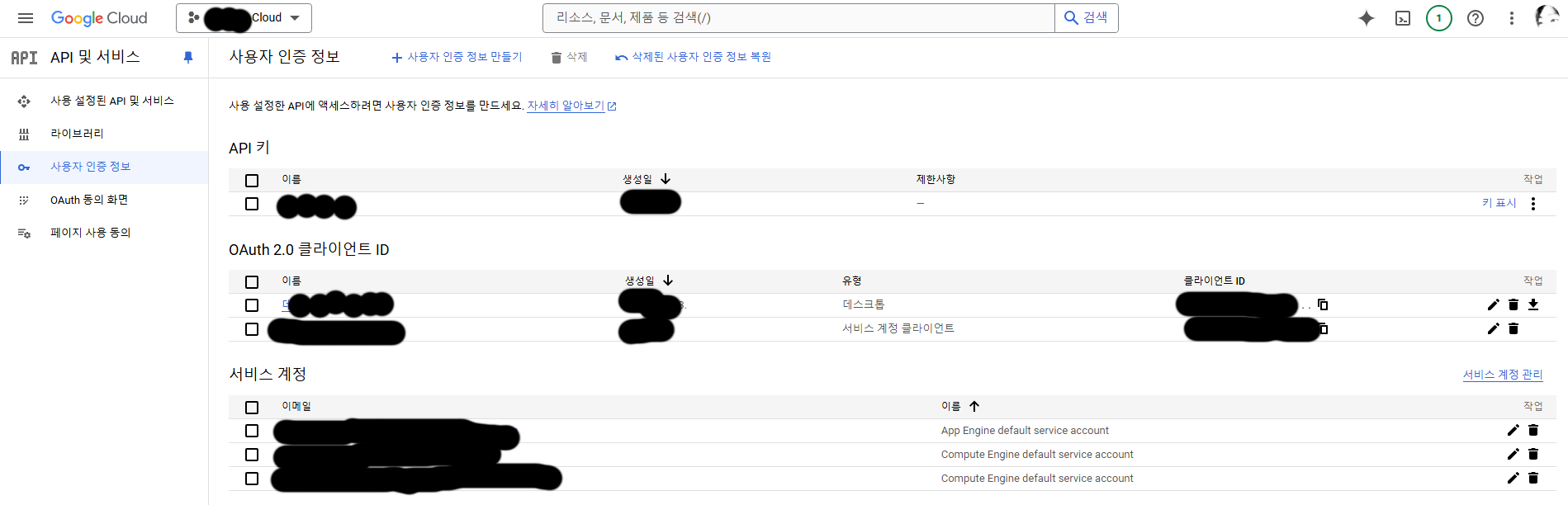
+ 사용자 인증정보 만들기를 클릭 하시구요.
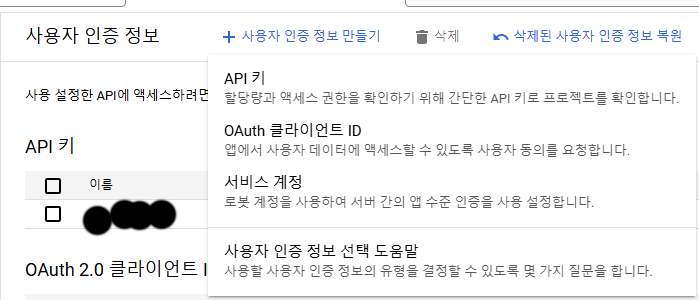
저기서 OAuth 클라이언트ID를 선택하십시오.
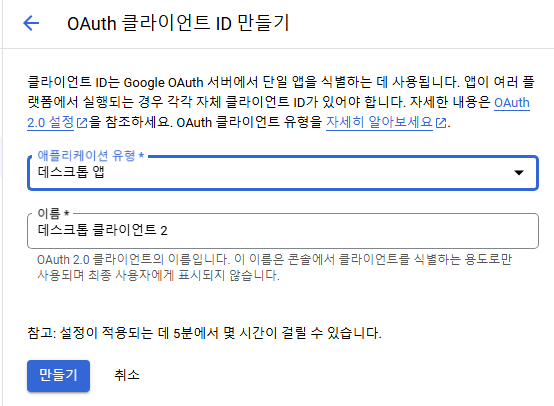
어플리케이션 유형을 데스크톱으로 저는 진행 했습니다.
만들기를 누르십시오.
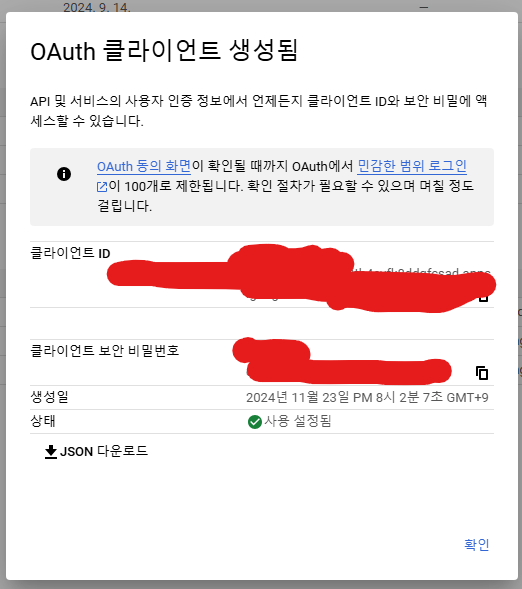
위 그림에서 JSON 다운로드를 클릭하시면 됩니다.
이렇게 하면 일단 API 상으로 블로그에 포스팅할 준비가 되었습니다.
블로그 아이디 확인하기
``` from googleapiclient.discovery import build
from google_auth_oauthlib.flow import InstalledAppFlow
import pickle
import os
def authenticate_google():
scopes = ["https://www.googleapis.com/auth/blogger"]
credentials = None
if os.path.exists("token.pickle"):
with open("token.pickle", "rb") as token:
credentials = pickle.load(token)
if not credentials or not credentials.valid:
flow = InstalledAppFlow.from_client_secrets_file(
"다운받은시크릿키파일명및경로로", scopes
)
credentials = flow.run_local_server(port=0)
with open("token.pickle", "wb") as token:
pickle.dump(credentials, token)
return build("blogger", "v3", credentials=credentials)
def list_blogs():
service = authenticate_google()
response = service.blogs().listByUser(userId="self").execute()
for blog in response.get("items", []):
print(f"Blog Name: {blog['name']}, Blog ID: {blog['id']}")
if name == "main":
list_blogs() ```
위 코드를 check_blogger.py로 저장 하십시오.
conda activate steemit
pip install pymysql steem google-auth google-auth-oauthlib google-api-python-client
스팀잇 가상환경을 활성화하고 필요한 라이버래리를 설치 합니다.
블로그에 포스팅 하기
``` import pymysql
from markdown import markdown
from steem.utils import markdown_to_html
import google.auth
from googleapiclient.discovery import build
from google_auth_oauthlib.flow import InstalledAppFlow
from google.auth.transport.requests import Request
import pickle
import os
class BloggerUploader:
def init(self, db_config, blogger_blog_id, google_credentials_file):
self.db_config = db_config
self.blogger_blog_id = blogger_blog_id
self.google_credentials_file = google_credentials_file
self.service = self.authenticate_google()
def authenticate_google(self):
"""Authenticate to Google API and return the Blogger API service object."""
scopes = ["https://www.googleapis.com/auth/blogger"]
credentials = None
# Load credentials if they exist
if os.path.exists("token.pickle"):
with open("token.pickle", "rb") as token:
credentials = pickle.load(token)
# If credentials are not valid, reauthenticate
if not credentials or not credentials.valid:
if credentials and credentials.expired and credentials.refresh_token:
credentials.refresh(Request())
else:
flow = InstalledAppFlow.from_client_secrets_file(
self.google_credentials_file, scopes
)
credentials = flow.run_local_server(port=0)
# Save credentials for future use
with open("token.pickle", "wb") as token:
pickle.dump(credentials, token)
return build("blogger", "v3", credentials=credentials)
def fetch_pending_posts(self):
"""Fetch posts with blogger_yn = 'N' and tags containing 'dev'."""
connection = pymysql.connect(**self.db_config)
try:
with connection.cursor(pymysql.cursors.DictCursor) as cursor:
query = """
SELECT post_id, title, body, tags
FROM postings
WHERE user_id = 'talkit' AND tags LIKE '%dev%' AND blogger_yn = 'N'
ORDER BY created_at DESC
LIMIT 1
"""
print(query)
cursor.execute(query)
return cursor.fetchall()
finally:
connection.close()
def post_to_blogger(self, title, content):
"""Post content to Blogger."""
post_body = {
"kind": "blogger#post",
"title": title,
"content": content,
}
try:
post = (
self.service.posts()
.insert(blogId=self.blogger_blog_id, body=post_body)
.execute()
)
print(f"Post published: {post['url']}")
return True
except Exception as e:
print(f"An error occurred: {e}")
return False
def update_post_status(self, post_id):
"""Update the blogger_yn column to 'Y' for the given post_id."""
connection = pymysql.connect(**self.db_config)
try:
with connection.cursor() as cursor:
query = "UPDATE postings SET blogger_yn = 'Y' WHERE post_id = %s"
cursor.execute(query, (post_id,))
connection.commit()
finally:
connection.close()
def run(self):
"""Fetch pendings posts and upload them to Blogger."""
pending_posts = self.fetch_pending_posts()
if not pending_posts:
print("No pending posts to upload.")
return
for post in pending_posts:
print(f"Uploading post: {post['title']}")
content = post["body"]
# Convert Markdown to HTML
content_html = markdown(content)
if self.post_to_blogger(post["title"], content_html):
self.update_post_status(post["post_id"])
print(f"Post {post['post_id']} marked as uploaded.")
if name == "main":
# MySQL Database configuration
DB_CONFIG = {
"host": "디비서버주소",
"user": "디비아이디",
"password": "디비비밀번호",
"database": "데이터베이스명",
"charset": "utf8mb4",
}
# Blogger and Google API configuration
BLOGGER_BLOG_ID = "앞에서확인한블로그아이디"
GOOGLE_CREDENTIALS_FILE = "다운로드받은시크릿키위치및파일명"
uploader = BloggerUploader(DB_CONFIG, BLOGGER_BLOG_ID, GOOGLE_CREDENTIALS_FILE)
uploader.run() ```
위 파일을 steemit_post_to_blogger.py 로 저장하십시오.
위에서 수정하실꺼 수정하시고 돌리시면 됩니다.
conda activate steemit
python steemit_post_to_blogger.py
위와 같이 합니다.
``` SELECT post_id, title, body, tags
FROM postings
WHERE user_id = 'talkit' AND tags LIKE '%dev%' AND blogger_yn = 'N'
ORDER BY created_at DESC
LIMIT 1 ```
위코드를 수정 하셔야 합니다.
talkit은 제아이디니까 본인 아이디로 %dev% 는 개발이어서 다른 주제를 원하시면 태그를 바꾸시면 됩니다.
감사합니다.
댓글